Showing posts with label pencil. Show all posts

Monday, August 12, 2019

Back to School 3D Gift Cartons

Back-to-school themed gift cartons can hold a treat 
for educator or student. 
Two sections join at side seams with 
interlocking bottom panels for quick assembly. 
Bend along diagonal side top panels for 
the classic milk carton look. 
Thread 1/2" or slightly narrower ribbon
through top shaped flange slots that
line up on front and back.
Choose from three assembled front
decorations that bend to align with
carton contour.
Each measures approx. 3” wide x 3” deep 
x 5” tall when closed. 

(This tutorial is under construction.
Please return soon to view
the completed assembly guide.)

ASSEMBLY: 1. Identify and cut the shapes:
A and B carton shapes
Pencil decoration shapes:
C pencil base with D eraser & E carbon tip
F shaft shape, G band base and accent bars
2. Prepare each of the hull shapes by bending on
the perforations as shown, as "mountain" folds
for all except the diagonal roof folds,
and the top flange perforations, which 
are folded as valley folds.
To fold the diagonal folds, it may be necessary
to turn the shape face down, and isolate
the diagonal folds away from the rest of hull.
3. Position and align the two hull shapes side by side
to overlap the straight side edge of one (on left here)
over the adjacent side tabs, adjust for top-to-bottom
alignment, then attach to join the side seam.
4. Form the hull into a box tube to repeat the side seam
alignment and overlapping, then join side seam #2.
NOTE that the hull can be flattened to allow
fingertip pressure to be applied along the length
of the side seam if desired.
5. Identify the tiny numbers cut into the bottom
flanges of the hull (shown here before the side
seams are joined). These will assist in the configuration
of the bottom interlocking arrangement.
A. Fold the front/back #1 flange under.
B. Fold the side #2 flanges in toward center.
C. Fold the #3 front/back flange under and . . . 
. . . distend the flanges inward until . . . 
. . . the #3 tab end clears the #1 slot edge,
then allow the flanges to re-adjust to be flat.
6. To prepare the top for closing, push the diagonal
side panels inward, then push the front/back flange
panels inward so that the flanges and slots
line up. Re-open to place contents inside,
then re-close and apply temp adhesive to
one flange to join them securely together.
Thread ribbon through slots.
7. For the Pencil decoration, bend the base
back slightly along the perforation as shown.
Attach the eraser and carbon tips shapes.
8. Attach the bands to the base, then position
between the perforation line and the bottom
of the eraser shape.
9. Position and attach the shaft shape below
the band shape, allowing the perforation to
continue to bend to match the angle of the carton.
10. Position over the bend of the carton, and attach.
Here is the completed pencil decoration version.
11. For the Apple decoration, prepare the leaf
and flesh half heart units by layering and attaching
the components as shown.
12. Bend the apple main shape and the slice shape
back slightly on the perforation lines.
13. Position and attach the main shape and slice
shapes by aligning the perforation lines,
while lining up the inner cut edge on the vertical
center line.
14. Position and attach the half heart accent shape.
15. Attach the other shapes, then position
and attach to the carton front by aligning the perf
lines.

Here is the completed apple decoration carton.
16. For the Books Stack decoration, cut the shapes:
A offset base alignment guide  B books stack base
C bottom book "cover"
D middle book "cover" with E opt. contrast pages shape
F upper book "cover"
G apple with lower perf line
H leaf base and lower contrast shape
I stem   J letter A
17. Position and attach the apple over the offset
base with bent perf lines aligned.
18. Position and attach the accent "cover" shapes
over the books stack base.
19. Position, insert and attach optional contrast pages shape
in between the middle "cover" shape arms.
20. Position and attach the books stack unit
over the offset base, below apple, with offset
margins even all around.
21. Position and attach the accent shape over
the front of the carton, lining up the bends of
the perforation lines.

Here is the completed books stack version.

Sunday, August 21, 2016

Pencil Chubby Hidden Gift Card

Say thank you to an educator, colleague or student. 
Hide a gift card in the recess of the eraser-end 
built-up layers slider, then insert into the shaft compartment. 
Attach tag with "thanks!" welded word using mini brad 
or twine through punch hole in eraser end. 
Measures approx. 4.25" x 7" when closed. 

(This tutorial is under construction.
Please return soon to view the completed assembly guide.)
ASSEMBLY: 1. Identify and cut the shapes:
A main pencil "front" panel
B "lead" pencil tip accent   C "paint" accent
D "metal ring and bands" accents
E pencil shaft back/base
F shaft build up shapes (5)
G"eraser" slider/carrier back
H "eraser" slider/carrier build up shapes
I & J "eraser" tip front and back
K "thanks" word cut and tag
2. Prepare the shaft build up by positioning and
attaching the (5) shapes to each other,
one at a time, taking care to match cut edges
as accurately as possible.
NOTE: it may be helpful to use a flattening weight
during the gluing process to prevent warping.
3. Position and attach the shaft build up unit
to the backside of the shaft base/back shape,
taking care to line up matching edges carefully.
4. Prepare the shaft front by positioning and
attaching the accent shapes.
5. Apply adhesive to the face surface of the
build up shape, then position and attach
the shaft front unit, taking care to line up
matching edges carefully.
6. Position and attach the slider build up shapes
to each other in a stack, one at a time,
taking care to line up all cut edges as accurately
as possible.
7. Position and attach the slider build up shape
to the backside of the slider back base,
lining up edges accurately.
8. Position and attach the eraser tip shape
front to the front of the slider assembly.
Position and attach the back tip shape also.
9. To assemble, insert the slider into the channel
created by the build up layers . . . 
. . . insert the gift card into the recess,
then slide the slider into position fully
where it will be hidden.
10. Assemble the tag by positioning and attaching
the "thanks" word cut to the front of the tag.
Position and attach tag to the eraser tip front
using a mini brad through the punch hole,
bend back prongs on back side.
(Or attach with ribbon or twine, etc.)
Here is the completed hidden gift card.


Sunday, May 18, 2014

Teacher Appreciation Dimensional Box Card Tutorial

Say "thank you" to a special teacher or school official
with this unique and choc-full dimensional card.
First, build the "bottom-less" box that can fold flat for 
inserting in an envelope. Add patterned paper accent shapes on the flaps
and box sides, two bridge strips to "support" the decor shapes,
then build and attach the shapes.
These include (back to front): "Thank you!" layered phrase,
star trio, A+ shape, books stack, cut apple, pencil, "Teacher" layered plaque.

CONSTRUCTION:
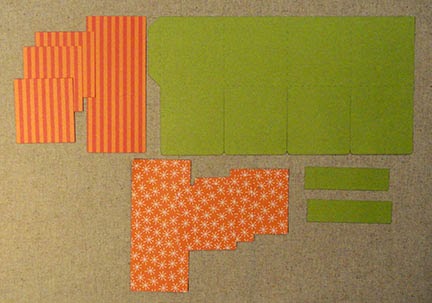
1. Identify and cut the parts for the box. Top row includes the four outer box decor shapes and the box body. Bottom row includes the flap decor shapes and the two bridge strips.


2. Position and attach the box decor shapes. These are offset at the sides and top, but the bottom edges should fit flush against the bottom edge of the box body.


3. Position and attach the flap decor shapes. These are offset and aligned similarly to the box decor shapes, as described in Step 2 above.


4. Fold the box into a "tube" shape, and attach the side tab to the opposite straight side edge. Take care that the bottom edges both align exactly as the seam is made.


5. Prepare the bridge strips by folding back the end tabs.


6. Insert the bridge into the box, then glue each end tab to box sides, placing the bridge approximately 1/3 of the way back from the box's front.


7. Before glue dries, fold the box flat as shown so that the bridge can adjust itself as needed to allow the folding flat. Apply pressure with fingers at the bridge's connector points to box, to ensure the adjustment, and firm re-attachment of the tabs inside the box.

8. Repeat the placement of the back bridge, approx. 1/3" forward from the box's back. Repeat the folding/adjusting step also.


This image shows both bridges in place.

9. If you plan to use the plaque with the hole punch and brad, you will need to transfer the punch hole through the front flap. Use an instrument like this sharp awl to push through the existing hole of the front flap decor shape.


10. Assemble the layers to complete each of the decorative shapes as shown.


11. Position and glue the plaque in place. Attach the brad through the hole.


12. Attach the "Thank You!" arch phrase on the back "flap" near the top. Attach the stars cluster below. To provide added dimension, attach a few foam squares to the back of the stars shape before attaching.


13. Attach the books stack with tab extension behind the back bridge, and as far left as possible.

14. Attach the A+ shape on the front of the back bridge, centered. For added dimension, attach foam squares to the A+ backside where it will touch the books stack behind.

Here is the placement of the A+ shape.


15. Attach the bottom edge of the apple and pencil to the front of the front bridge as shown, left and right. Aim at placement that allows as much of the behind layers to be seen from the front as possible. (Tricky, I know, with this much going on!)
16. With the shapes in place, fold the card flat to make sure it can still fold flat easily.

NOTE 1: This "fold test" should be performed after each set of layers is added, in case adjustments are needed.

NOTE 2: If you plan to use the SnapDragon custom envelope design, make sure the shapes don't extend beyond a 7x7 inch square (actually, slightly inside that perimeter measure, so it will slide inside).


Hope you've enjoyed creating this dimensional card!
Please check out the other "box card" designs
available from SnapDragon Snippets.