from SnapDragon Snippets.
 |
| A mini quilt with a trio of 75% redux leaf blocks. |
TUTORIAL
Preparation for a Reduced Size Block
(Skip to Step 5 if you are NOT reducing your block size.)
1. To demonstrate one process for scaling a paper foundation block, this tutorial will use the 4" original block, but reduce it to a 3" block. With many cut designs, determining new size and making the adjustment to that size is all that would need to happen. However, with a stitching block foundation like this one, the seam allowance needs to remain EXACTLY at 1/4" for all seamed edges. When a block size is scaled, or size changed, the seam allowance is modified also. The easiest way to correct this distortion is to RE-DRAW the seam allowances BACK to the 1/4" accurate size.
Using my project of this demo, I use the tools in my Silhouette Studio to reduce at 75% all of the block parts in the file (Section A, Section B and Template C). Then I set up an 8.5x11 page size on my screen and mat, duplicate and place as many diagrams for blocks as I can fit or need, then use the commands to tell my printer to print the page I have set up.
The file is set up originally as a PRINT & CUT design, but for a scaled copy, I will simply disable the cut part by deleting the cut lines.
2. First I will re-mark the new cutting edge on Template C. On my printed sheet, I use my gridded see-thru ruler with the 1/4" line closest to the right edge lined up exactly on the dashed seamline, then trace a pencil line that adds a little to the shape to restore the seam allowance to the full 1/4". Move the ruler to mark the change on all four sides.
If I had ENLARGED the block, this remarking process would REMOVE some of the EXTRA seam allowance created in the expansion.
3. Do the same adjustment tracing of seam allowance around all the edges of EACH of the diagrams that will be used. This includes the edges of multiple blocks.
(You only need to mark one of Template C, since you can re
-use the same one to trace the C patch for subsequent blocks.
4. I disabled the "cutting" part of this, so I will just use my paper scissors to trim a little beyond my newly re-marked cutting outside lines.
I will need a Section A & B each for one block.
CONSTRUCTION TUTORIAL
5. I will demonstrate machine paper foundation (MPF) piecing for one leaf block. I have decided to use two coordinated rust fabrics with one light background.
Section A will use the rust fabric ONLY plus the background. Section B will use the darker batik fabric plus the background.
You can use just one "leaf" fabric in place of the pair I have selected, plus one background, for a solid colored leaf, if you wish.
6. Use a straight edge like a post card or book mark as a folding tool. Place the trimmed diagram face up on the table. Lay the edge of the book mark along each of the interior solid lines, then fold the paper over the book mark. Move the tool and fold on ALL interior lines.
7. Examine the diagram. Each shape has an "order" number and a color or fabric designation. We will begin with patch 1 which uses "background" fabric.
8. Turn the diagram over, making sure you focus on where patch #1 is as you see the diagram from the back. Use fabric glue stick and rub a dab on the back of patch #1
9. Place background fabric FACE DOWN on the table. Place the BACKSIDE of paper diagram against the BACKSIDE of the fabric, arranging the diagram so that there is fabric underneath patch #1, and so that enough extends around it to include the 1/4" seam allowance at the edge, and the same beyond the LINES defining patch #1.
10. Trim away excess background fabric that you won't need. To do this, keep the fabric under patch #1 face down on the table throughout the trimming process. One by one, fold the paper diagram on the lines that surround patch #1.
Here I begin to fold along the short part of the line that connects patch #1 and patch #4. When the diagram is folded (paper only), I will trim away the extra 1/4" beyond the folded edge. Then I will UNFOLD, then fold along the line between patch #1 and patch #3, then trim excess leaving the seam allowance. Finally I will unfold, then fold along the line between patch #1 and patch #2 and trim.
This image shows the diagram folded at the line between patches #1 and #3. I am using a clever tool called "Add An Eighth" ruler that has a raised lip 1/8" in from the right edge. That lip can be slid next to the diagram fold where it will catch and stop. Then, with the layers on my cutting mat, I use my rotary cutter to cut along the ruler edge. This makes the process quick and very neat!
The original tool was "Add A Quarter" which is a more standard seam allowance. For a miniaturized block like the reduction I am making, the 1/8" seam allowance will be okay.
11. Unfold the diagram and identify patch #2 and its fabric designation. My leaf color for this half is ruse.
Also take note of the target stitching line for adding this #2 patch, which is the line between #1 and #2.
Fold the diagram ON that line.
12. Place the leaf fabric FACE DOWN on the table. Place the diagram with patch #2 over a corner or other efficient location, then trim a fabric shape generously large enough for the #2 shape plus seam allowances at diagram edge, and BEYOND all of its boundary lines.
Place that shape FACE UP on the table surface.
13. Fold the diagram on the patch #2 seamline, that is, the line between #1 and #2. Keep the #2 shape (seen from the backside of diagram) as the top layer so you can see it best. I have outlined the shape with red pencil for visibility during this tutorial. Move the shape over the cut patch from the previous step until it is centered with enough seam allowance margin all around. (NOTE this image is showing the edge of the yardage instead of the cut patch.)
14. Without letting anything shift, carefully unfold the diagram so it is flat with print side up and fully visibly
If it is helpful, connect the layers temporarily in this arrangement by pushing is straight pin through the layers.
15. Take the work to the sewing machine. Adjust machine stitching to 12-15 stitches per inch which is about half as long as regular quilt patch stitching length. Begin at the edge of the diagram to stitch EXACTLY ON THE LINE between #1 and #2. For the leaf block, this first stitching line does NOT have another line crossing it on this end, but it extends instead to the edge of the diagram. Therefore, it is best that the stitching begins at the diagram edge, then continue to stitch across ....
and end 3 stitches BEYOND the end of the line. Cut threads and remove from machine.
Re-fold diagram along stitching line as it was for positioning, then use the Add An Eighth ruler or equivalent to trim excess next to seam.
16. Press patch #2 back, working from the front.
Turn the diagram over, then fold along EACH of the line segments that bound patch #2 and trim excess leaving the desired seam allowance (either 1/4" or 1/8" as I am doing with the sample). Watch to make sure you are trimming just the excess and NOT the fabric that should remain as the patch!
17. Turn the diagram over once more, then trim excess BEYOND paper edge.
18. Identify patch #3 and its fabric. Fold the diagram along the target seamline, which is the line that separates #3 from the previously added patches (#1 & #2). Make sure that the diagram backside with #3 patch's fold outlines are the TOP layer.
19. Cut a patch for #3 from leaf fabric as was done for patch #2 (step 12). Lay the cut patch FACE UP on the table, then lay the folded diagram over the patch. Fabrics of previous patches and the new patch will now be FACE SIDES TOGETHER which is the usual arrangement in piecing.
Adjust the position of the diagram to make sure there is enough fabric all around the patch (highlighted here in red).
20. Without letting anything shift, carefully unfold and take the assembly to the sewing machine.
21. Insert the machine needle approx. 3 stitches BEFORE the start of the line, stitch across EXACTLY ON the line, then stitch 3 stitches BEYOND the end of the line.
22. Press patch #3 back. Turn diagram over and trim excess beyond each of the line segments that bound area for patch #3, as for patch #2 previously.
23. Continue working through the patches, one at a time, using the same process of identifying patch position and fabric, cutting a generous patch size, folding diagram on traget seamline, arranging diagram to sew, then stitching, pressing and trimming. This is what Section A looks like with all the patches in place.
24. Place the assembled diagram FACE DOWN on the cutting mat. Use a rotary ruler and cutter to trim on the OUTSIDE SOLID line.
(Remember that if you modified the size, and made seam allowance adustments, you will be trimming on a NEW, traced cutting line.)
25. Here is the trimmed section. It looks so much better than it did with ragged edges. Make sure you take a moment to celebrate the accomplishment!
26. Transfer the INSET SEAM corner dot from diagram to fabric backside. Use a thick push pin or needle to pierce the paper at the corner in patch #7. Then...
use a mechanical pencil to insert lead through pierced hold to mark the dot position on the fabric backside.
27. Working from the back, remove the paper one section at a time. Find the highest number patch, fold along the stitching line, then unfold and tear along stitching perforation. Continue working backward in construction order until all paper sections are removed.

28. Now complete Section B with your selected fabric.
This image shows both halves, along with the corner patch with stem applique -- but wait, I am getting ahead of myself. Let's talk about the stem applique now.
29. Trace corner patch using template on the backside of fabric. Transfer the corner inset seam dot as was done for Section A (step 26). Cut out the patch.
29. Use the Template C to help mark the stem location onto the FRONT of the corner square patch. Trim away the stem shape and retain as a stem template. Position the template over the FACE SIDE of patch and trace position with temporary marking tool.
30. Select your favorite method to applique the stems onto the square prior to piecing the final block seams.
For this sample, I am creating fusible appliqued stems. Trace the stem on the paper side of the fusible web. NOTE that in when making fusible appliques, the traced shape is a MIRROR IMAGE of the final shape, so turn the template over to be opposite the way you want the stem to curl.
31. Follow the instructions that come with the fusing to fuse the paper with tracing onto the backside of stem fabric, trim out the shape, remove paper backing, etc. Position cut shape on the patch according to the previous markings. Fuse in place. Over-edge to finish the cut edges neatly.

32. The following several steps will demonstrate the INSET CORNER SEAMS. Bring the two leaf halves together. Push a straight pin through the marked corner dot of the front layer, then fish the point around until it comes through the dot on the back layer. Insert pin to hold. Also push a pin through to align the pointed seam of front and back layers.
33. Adjust machine stitching length back to normal. Make a 1/4" seam beginning at the section raw edges (shown here at the left end of the seam) and sew along to the dot, then pivot and lock stitching. See detail of this stopping and locking at the dot in the image below.
Press the seam to one side.
34. Position and compare the corner square to the inset area. Rotate the square downward so that it is FACE TOGETHER with the lower leaf inset edge.
35. Push pin through at square patch corner dot, then push pin through at the end of the center seam in the leaf assembly underneath. Also align the opposite corners that will complete this seam edge.
Stitch the seam, sewing from the outer block raw edge, along seam, then stopping and locking (backstitching, stitch in place, or pivot and retrace previous 2-3 stitches, etc.) at the marked dot.
Press seam toward leaf side.
36. Open and pivot the corner patch so that the final inner edge aligns with the corresponding edge of the other leaf. Push pins through at dots of both layers, and also near block edge as before. Stitch the seam as with previous seam, stopping and locking at marked dot.
.
37. Press seam toward the leaf side. Press block well.
Notice the excess seam allowances that swing away from the acute angled seam near the lower right corner of the block. Use scissors or rotary cutter to trim these even with block raw edges.
The block is now ready to incorporate into your project.
I have added narrow background borders around my leaf block to make it "float" inside my block. I stitched three different color pair blocks, joined them side by side, added a narrow and wider border, layered and machine quilted it. You can see my finished quilt for inspiration for your own fun projects below.
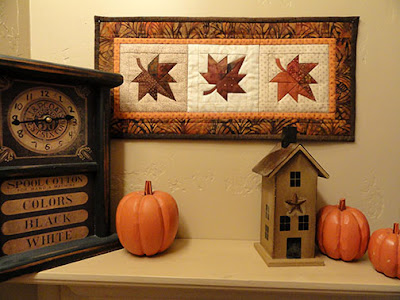 |
My leaf blocks trio mini quilt above the shelf
where it was designed to hang. |


