Friday, July 15, 2022

Stitched Snowflake Joyful A6 Card

Add a hand-made touch to this side-fold card 
with embroidery long stitches. 
Two overlays  create a narrow contrast border to frame 
the featured double-layered snowflake. 
Stitching holes allow for 3-ply floss stitches to be added 
to create a wheel motif at six points, smaller radiating motifs, 
with other cut out shapes allowing contrast foundation snowflake 
to show through. Rotate the stitched snowflake slightly when positioning 
to attach, then add the “Joyful” word accent. 
Place jewels or studs at center, middle motif center holes 
and other punches as desired. 
A6 card measures approx. 4.63” wide x 6.25” tall when folded. 

ASSEMBLY: 1. Identify and cut the shapes:
A main card base - side fold
B front accent panel to create narrow border
C main front panel
D snowflake with stitching holes (2)
E snowflake offset contrast with stitching holes
F accent welded word   G red floss
2. (NOTE some of the next few images are
from a different project.)
Prepare the stitching hole punched shapes by
using a tool (such as this un-bent paper clip)
to push through all "chad" cut outs that may still
be attached or in pre-cut positions. Also make sure
all accent openings are cleared.
Brush off all "crumbs" possible.
3. Position and carefully align the snowflake shapes
 so that all the stitching holes align as exactly as possible. 
Use the punch-out tool to help with alignment, 
if necessary, then attach in place.
4. Repeat step 3 to position, align, and attach the layered
snowflake unit on top of the contrast accent snowflake.
To assist the shapes to attach well and remain flat
and not warp or curl during the liquid adhesive
drying process, press flat on a flat work surface using
a heavy flat weigh such as this large, thick book volume,
possibly with something heavy on top.
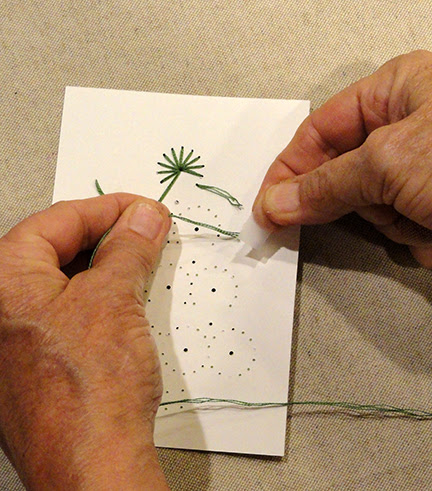
5.  Select the 6-ply embroidery floss color for
the stitches.
Then separate out three plies and line up the lead ends,
straighten out the lengths so there will be no tangling.
Thread lead ends through eye of blunt-tip tapestry
needle size 24 or equivalent.
6. Determine where you will begin stitching;
sample project begins at larger bottom center tip of a fan.
Use a small strip of cello tape to secure the tail ends
near beginning point. 
7. Insert the needle UP through the center bottom hole
 to begin the first fan unit. Pull thread all the way through
leaving no slack. 
8. Insert needle and floss DOWN through first side hole
at outer snowflake edge as shown. Pull thread all
the way through leaving no slack.
9. Continue to create long stitches by
passing needle UP through large bottom hole,
down through next un-filled outer hole, and so forth
until the fan motif is completed.
10. Move down below same fan motif to begin
wheel motif - insert needle and floss UP through
the wheel unit's center hole, then pass needle
and floss DOWN through the same bottom center
hole of recently-completed fan unit (shared hole).
11. Complete the wheel straight stitches all around.
NOTE: As thread on needle is used up, work needle
to backside, then secure trimmed end in a convenient
spot on backside of work with small piece of cello tape.
TIE ON a newly re-loaded needle as indicated in step 6
to continue to complete stitching.
12. Move to the wheel motif next to completed
motif units to work the small wheel motif there
in similar manner.
13. Continue to move to closest un-stitched fan,
large wheel and small wheel motifs in most
convenient and logical order to complete all elements.
14. To complete final center motif, bring needle and floss
UP through center large hole, then work straight
stitches around the wheel motif. End with needle on
backside of work, trim excess and secure tail with
small piece of cello tape.
15. Prepare card base by positioning (centered) accent
panel and front panel on front panel of folded
base panel, and secure in place.
16. Rotate the stitched snowflake slightly as shown
and position near top of front panel; also position
"Joyful" sentiment word below. Attach both in place.
Here is the completed card.


Thursday, July 14, 2022

Christmas Tree Stitched Wheels A6 Card


Ten stitched partial or complete “wheel” motifs in four rows 
create the Christmas tree silhouette with simple cross-stitched trunk. 
Stitching holes allow for 3-ply floss stitches to be added 
as “spokes” through center holes. 
Optionally add colored jewels or studs to cover centers.  
“Print & cut” front panel includes printed words “MERRY CHRISTMAS” 
across bottom. Middle overlay creates a narrow contrast border. 
Card measures approx. 4.63” wide x 6.25” tall when folded. 
Pattern and quantity of stitches is simple enough 
for children to help stitch. 

ASSEMBLY: 1. Identify and cut the shapes:
A side fold card base
B offset accent panel
C front "print & cut" front panel with stitching holes
D tree shape with star overlay
2. Follow basic "print & cut" instructions to prepare
and print the white cardstock panel page, then . . .
. . . position the page on the cutting sheet . . . 
. . . and cut the front panel shape with the "MERRY 
CHRISTMAS' printed words.
3. Prepare the stitching hole punched shapes by
using a tool (such as this un-bent paper clip)
to push through all "chad" cut outs that may still
be attached or in pre-cut positions. Brush off
all "crumbs" possible.
4. Position and attach the star overlay.
5. Position and carefully align the tree shape
on the front of front panel so that all the stitching holes
align as exactly as possible. Use the punch-out tool
to help with alignment, if necessary, then attach in place.
To assist the shapes to attach well and remain flat
and not warp or curl during the liquid adhesive
drying process, press flat on a flat work surface using
a heavy flat weigh such as this large, thick book volume,
possibly with something heavy on top.
6. Select the 6-ply embroidery floss color for the wheel
tree accents.
Then separate out three plies and line up the lead ends,
straighten out the lengths so there will be no tangling.
Thread lead ends through eye of blunt-tip tapestry
needle size 24 or equivalent.
7. Determine where you will begin stitching;
sample project begins at top wheel.
Use a small strip of cello tape to secure the tail ends
near beginning point. 
8. Insert the needle through the first hole to begin
the first wheel unit. Suggested starting point is
top wheel lower left outer hole.
Pull thread all the way through
leaving no slack. 
9. Insert needle down through center wheel hole.
10. Continue the stitching UP through the next up adjacent
stitching hole, and down through the center hole,
and repeat until all stitches in top wheel are complete,
as shown here. Thread ends on backside.
11. Move downward to the closest unstitched wheel
and continue to stitch. When floss length is completely
used, finish with needle on backside, trim ends to
.75"-1" and secure with small cello tape strip.
12. Re thread another set of 3 strands of floss,
and tape ends near re-start position.
13. Continue to complete the wheels stitches.
14. NOTE that there are two stitching holes
that are shared by the adjacent wheels
on second, third and fourth rows.
15. As stitching is completed to mid-point of
bottom row, move down to complete the trunk
cross stitches: first complete the slant stitches
in one direction across top row, then work back
across row to complete the slant stitches of same row.
16. Complete the trunk cross stitches, then . . .
. . . move back up to complete the final wheels.
When stitching is complete, finish with the needle
and floss on the backside, tape off and trim floss.
17. Position and attach stitched panel securely
on accent panel with narrow margin exposed
all around.
18. Position and attach the front panel assembly
onto the front panel of card base with even margin
exposed all around.

Monday, July 4, 2022

Gingerbread Man Bakery Shop Card


Celebrate your favorite Christmas cookie traditions. 
Simple throw-back shop front with tall marquee, 
striped awning and door arch is the backdrop for 
the little layered gingerbread guy with squiggle icing details.  

Window frame trios flank doorway, with “Christmas” cursive word cut 
above “BAKERY” stencil cut arch front 
(be sure to retain the separate ‘A’ and ‘R’ centers). 
An alternate "Sweet Stuff" bakery title also included.
Optional interior bracket sentiment panel aligns 
at top fold perforation. 
Card measures approx. 5” x 7” when folded. 

ASSEMBLY: 1. Identify and cut the shapes:
A card base (top fold card)  B front panel (background)
C shop silhouette base    D top marquee trim overlay
E awning arch: front, bottom trim, contrast underlay
NOTE: retain the interior shapes from 'A' and 'R'
to position and attach within letter cutouts
F awning strip    G awning cross strip trim (2)
H shop front side strips (2)
I window panes (vellum if desired; 2)
J window frame grids (2)    K window lower trim contr.
L doorway base    M doorway frame trim
N gingerbread man: base, body, head
O gingerbread man features & icing shapes (5)
2. Begin assembly of the shop store front by
positioning and attaching the marquee trim overlay
along top and upper side edges of front base.
3. Position (centered) shop front base onto front panel
with bottom straight edges aligned.
4. Position the door shape into the doorway cutout
of shop front, then position and attach the trim
around door.
5. Position and attach the awning strip across shop front,
then position and attach the narrow trim strips across
each side of the awning to be even with doorway frame top.
6. Position and attach the window frame shapes
on front and at top of panes base shapes
for two window units.
Position and attach the base trim shape under
the panes shapes.
7. Position and attach the lower side shop front
trim overlays at shop base sides.
8. Position and attach windows to abut side edges
along trim edges (from step 7), and slightly below
scallop awning edges. 
9. Position and attach awning arch contrast behind
main shape, then position and attach the separate
interior shapes for 'A' and 'R' letters.
10. Position and attach the add-on scallop trim shape
along bottom edge.

11. Position BAKERY assembly centered 
over door frame.
12. Position shop and front panel assembly,
centered, over folded card base front.
13. Assemble the gingerbread man . . .
. . . by layering A) head onto body; B) eyes into
cutout openings and smile in position as shown 
(add smudge cheek rouged highlights if desired);
C) icing hair, wrists and anklets as shown.
14. Position and attach body assembly onto body base,
then position and attach buttons into cutout openings.
15. Select from the two options of cursive word cuts
for the marquee front.
16. Complete card front by positioning and attaching
gingerbread man onto card front.
Position and attach selected word cutout onto marquee.
If using "Christmas" cutout, don't forget to retain
and position the 'i' jot circle punch.
Or use the two-part "Sweet Stuff" words cut.
If preferred, substitute the Doodle Bug 
gingerbread man embellishment.